
You won’t find Blender’s best features in flashy demo reels or polished YouTube tutorials—they’re hidden in the raw R&D videos artists all over the world casually drop online. So, let’s scrape the web and check out the coolest Blender demos this 3rd week of September 2025!
Kicking things off, here’s a face wrinkle demonstration by Ryan. Normally, wrinkle deformations are set up with shape keys, but here they’re driven by a wrinkle normal map—and the results are flawless. The wrinkles appear exactly where you’d expect them to form, then fade away naturally. And since it’s powered by a normal texture instead of geometry, your model can stay low-poly while still looking incredibly detailed.
Next up is a next-level retopo demo using Oktopo Remesher. This tool automatically generates clean quads with those iconic face edge loops you usually only see in carefully hand-made models. These edge loops and rings aren’t just for show—they’re absolutely critical for getting natural wrinkles in faces and making sure mouth movement and facial deformations don’t look weird. In fact, they’re basically a requirement for any character that’s meant to animate properly.
I’m not sure if the addon handles hands and other tricky body parts that also rely on this type of topology (haven’t tested it myself yet), but just judging from this demo, the results are seriously impressive.
From clean topology to full-on cinematic chaos, the next demo cranks things up another level with yet another masterpiece from Machinima. At this point, I’m convinced he’s secretly making a blockbuster—but by the time it’s finished, I’ll probably have already “watched” the whole thing through these demo snippets. No complaints though—I’d still enjoy it just the same!
The level of detail in every scene is jaw-dropping. It feels like there are a hundred simulations happening at once—RBD, smoke, fluids, particles, cloth—and I’m pretty sure even the clouds are dynamic, not just HDRIs. Seriously, you’ve got to check out his Twitter; it’ll blow your mind.
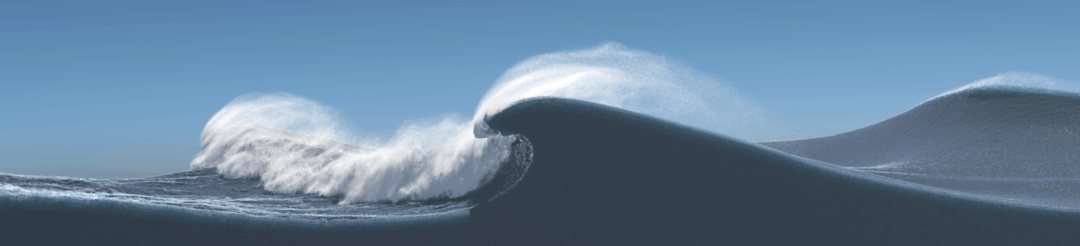
And if you thought that was impressive, just wait until you see this—millions of particles swirling together in a truly boundless FLIP simulation. To be clear, this one isn’t running in Blender (the day that happens will be historic), but it’s such a jaw-dropping demo that it deserves a spot here.
This comes straight from a new graphics research paper about combining different fluid simulation techniques to push performance and scale to an entirely new level. The result? Vast, endlessly detailed liquid simulations that behave with stunning realism, filling entire worlds with believable fluid motion.
If you want the full breakdown, Two Minute Papers has a fantastic video that explains the tech behind it in simple terms. Personally, this is the most satisfying fluid sim I’ve seen in ages—and it shows just how close we’re getting to bridging the gap between academic research and the tools we use every day.
I absolutely love seeing Blender used out in the wild, especially when it’s mixed with live-action footage. OctaSpace just dropped an action scene where they combined green screen footage with a fully Blender-built environment—and if you didn’t know, Blender has everything you need to handle masking and background removal right out of the box. The backdrop, the set extensions, even the explosion—it’s all done inside Blender.
Now, I was going to make the usual point about how Blender is making low-budget filmmaking more accessible than ever… but OctaSpace claims they pulled this off—199 frames at 2K resolution—for less than a dollar. And I’ve got to be honest: no way. Even ignoring the time, props, and effort, the electricity bill alone would eat that budget alive. Let’s be real—this shot probably cost at least ten bucks, and that’s assuming nobody got paid and everything else was free. Still, whether it was $1 or $10, the fact that it looks this good at that cost is mind-blowing.
Now, if you’re wondering what you just watched—don’t worry, I’m right there with you. I saw this about four hours ago and I’m still not sure how to feel. It’s amazing and weird at the same time. On the surface it looks basic and simple, but your brain and your experience just won’t let you accept it that way. You’re left in this strange space between admiration and confusion.
And of course, Nikita Diakur didn’t bother explaining anything either. They just dropped it, no context, no commentary—and left us to deal with it. So I’ll do the same.
So, the Blender Conference is happening—and if there’s one place to pick up new tricks from professionals, this is it. Case in point: Edward Ureña shared a demo showing how he gave a bunch of simple spheres real personality just by adding mouths to them. Suddenly, these plain shapes had life, attitude, and character.
Watching this, I realized I probably need to sit down and watch all the presentations—because I have no idea how to make animations like this myself. It’s wild how something so simple can feel so alive once you see it in action.
Sometimes I watch these demos just to remind myself of what’s possible. Take Dylan Donaldson’s latest work—he built it using a whole pipeline of tools: Blender, Houdini, Gaea, and Nuke. But here’s the thing: everything you see in that shot—the landscape, the background city, the clouds, the grass, the trees—could be made entirely in Blender if you wanted to.
That’s the beauty of it. You can go all-in and build everything yourself from scratch, or you can lean on libraries and assets that others have created to speed things up. Either way, the fact that a single artist can pull off this level of production is mind-blowing. Just a few years ago, work like this was only possible in big studios with massive budgets. Now? Anyone with Blender can make it happen.
Next up is Sergey Tyapkin, showing off how you can easily rectify UVs using Zen UV—an addon built for UV unwrapping in Blender. Now, only someone who’s actually wrestled with UVs before will truly appreciate how magical this demo is. Instead of painstakingly straightening edges by hand, you just select one vertex per island, hit a single button, and boom—all the edges snap perfectly straight.
Why does this matter? Because once your UVs are clean, things like adding text, decals, or logos become way easier. They won’t stretch or distort across the model—they’ll sit exactly where you want them, crisp and clean. For anyone who’s ever fought with UVs, this feels like a dream come true.
Saw this and had a good chuckle—because once you learn 3D, it basically becomes part of your everyday life. Blender Meme posted an image of two tomatoes: one with a shiny, reflective surface and the other with a rough, matte one. And it hit me—this is exactly how I catch myself thinking all the time.
I’ll be watching a movie, and instead of following the plot, I’m staring at the scratches on a wall, the way the cloth sim behaves, or how the reflections are set up. Next thing I know, I’ve missed half the story and have to rewind. So a 1 hour 20 minute movie ends up taking me two hours to finish. At this point, I can’t help it—I see renders everywhere.
This next demo by RyanWill is absolutely mind-blowing—though, unfortunately, it can’t really be recreated without the FLIP Fluids addon. The reason is simple: Blender’s built-in fluid system doesn’t support custom forces, which are essential here.
In the demo, you can see water clinging to a diamond as if the gem itself had its own gravity field—just like a tiny planet. Those are mesh forces, and I have only seen them in FLIP Fluids. It’s a perfect reminder of how addons can push Blender far beyond its native limits.
Speaking of addons and how they push Blender even further, next up is Ucupain—a free texturing addon. In this demo by Frenkd, you really see how free tools can rival (and sometimes even surpass) paid ones. The level of control and detail here is incredible, and honestly, I don’t think I’ve seen a paid texture-painting addon this feature-packed.
It’s a solid reminder that in Blender, sometimes the best tools don’t cost a dime.
Not much to say here—I’ll just let you admire this GBA glass cartridge render by Erman Malak. Sometimes the work just speaks for itself.
Next up, I’m adding a little section I’m calling “Best Addon Trailer.” This is just my way of showing appreciation to creators who go the extra mile to showcase what their addons can really do in action.

This week’s seal of approval goes to Fauna Master Pro. The addon is a massive collection of animated animals, insects, and birds—and the trailer nails it by simply letting the creatures loose. No gimmicks, no fluff—just a straightforward demonstration that shows both the strengths and limitations of the collection. And honestly, I appreciate that transparency.
And to sign off, just a quick reminder—I’ve got a new free addon up on blendereverything.com called SendNodes. With this addon, you can copy objects, meshes, materials, and even full Geometry Nodes setups directly from the website and paste them straight into Blender—no downloading first. It’s literally just copy and paste.
Right now, there isn’t a ton of content on there yet—but I promise you, by the end of this year, you won’t ever have to start a project from scratch again. My goal is to make this workflow even faster than the Asset Browser. Ideally, you’ll always have the SendNodes page open on the side, ready to grab whatever you need in just a few seconds.